Key features
Who are 365 Modules for?
365 Modules are ideal for:
- Organisations wanting targeted improvements without a full system implementation.
- Teams adding capability to an existing WHS, QHSE or intranet solution.
- Businesses replacing spreadsheets, emails and disconnected records.
- Organisations wanting to implement priorities in manageable stages.
- Teams wanting to manage and grow their Microsoft 365 solution internally.
 Customised for your organisation
Adapt module names, fields, responsibilities, workflows, forms, views and reporting so they reflect your organisation’s structure and ways of working.
 Choose what you need
Select individual modules or combine related modules into a practical package aligned with your current priorities, risks and ways of working.
 Connected Microsoft 365 capability
Use SharePoint, Microsoft Lists and approved Microsoft 365 tools to bring information, records, actions and oversight into one connected environment.
 Practical workflows and visibility
Configure responsibilities, due dates, reminders, approvals, status views and reporting to support consistent follow-through and clearer oversight.
 Designed to grow
Start with one priority area and add modules over time, using a consistent structure that can connect with broader systems and dashboards.
 Capability that stays with your team
Guided implementation, training and practical resources help users manage, maintain and improve their modules after launch.
 Great Value and One Off Fee
- No recurring subscription to Kitney Toolkit
- Digital products are paid up front with support packages available
 Comprehensive and Compliant
- Based on ISO 45001:2018 OH&S Management Systems
- Designed to meet Australia's model work health and safety legislation
- Easily adjusted to suit legislative frameworks, codes, and standards
 Additional Savings
- 10% off Kitney Toolkit documents and bundles for 12 months
 Not sure if this is right for your business?
Watch our videos, book a Discovery or contact us - we’d love to explore how it can work for you.
Contents
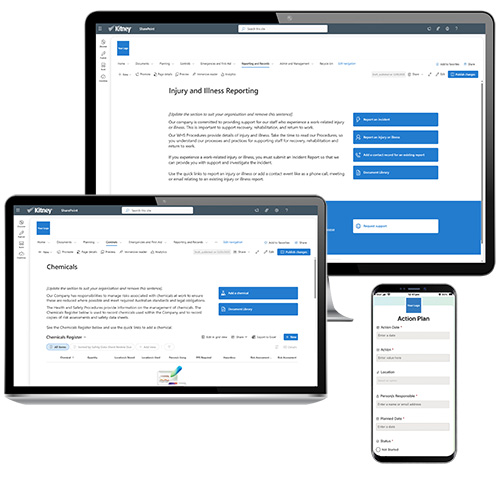
Choose modules from Kitney’s 365 WHS, QHSE and Intranet solutions or a specific procedure you need to establish in M365. Each module can be customised with inclusions, workflows and configuration confirmed during Discovery.
How it works
1. Discover and prioritise
Review your current systems, risks, obligations and improvement priorities to identify the modules that will provide the greatest value.
2. Select and scope
Choose individual modules or a related group, confirm users, records, responsibilities, workflows, forms, views, reporting and connections with existing systems.
3. Configure and test
Co-build and configure the selected modules in Microsoft 365, customise them to your organisation and test the content, permissions, actions, reminders and reporting with nominated users.
4. Launch and grow
Train module owners, launch the agreed functions and add further modules, workflows or dashboards as priorities and capability develop.
Available modules
Planning and Risk
- Action Plan: Captures actions, owners, priorities, due dates, progress and close-out evidence in one central register.
- Calendar: Provides a shared schedule for planned activities, reviews, inspections, training, communications and recurring obligations.
- Consultation and Communication: Supports consultation planning, meeting records, communications, feedback and evidence of worker participation.
- Information and Training: Organises training requirements, learning resources, competency records, attendance and renewal dates.
- Inspections and Audits: Plans inspections and audits, records findings, assigns corrective actions and monitors completion.
- Risk Management: Supports hazard identification, risk assessment, controls, reviews and visibility of priority risks.
Operational Controls
- Chemicals: Manages chemical information, registers, safety data sheets, risk assessments, storage requirements and review dates.
- Computer Use: Provides guidance and records for workstation set-up, computer-related risks and worker self-assessments.
- Contractors: Supports contractor engagement, prequalification, onboarding, document control, monitoring and review.
- Driving and Remote Work: Manages risks associated with work-related driving, travel, isolated work and remote activities.
- Manual Tasks: Supports identification, assessment and control of hazardous manual task risks and related actions.
- Maintenance: Plans and records preventive and corrective maintenance, responsibilities, schedules and completion evidence.
- Plant and Equipment: Manages plant registers, risk assessments, inspections, maintenance, licences and supporting records.
- Psychosocial: Supports identification, assessment, consultation, controls and review of psychosocial hazards and risks.
- Vaccinations: Supports organisational vaccination requirements, worker information, records and renewal reminders where appropriate.
- Wellness: Brings together wellbeing information, initiatives, resources, events and support pathways.
- Work from Home: Supports home-work assessments, approvals, equipment, responsibilities and periodic review.
Emergency and First Aid
- Emergencies: Organise emergency plans, contacts, roles, response procedures, drills and review records.
- First Aid: Manages first aid arrangements, officers, equipment, locations, inspections and replenishment actions.
Hazards and Incidents
- Hazards: Enables workers to report hazards, assign actions, monitor controls and track resolution.
- Incidents: Supports incident notification, initial response, investigation, corrective actions, review and closure.
 Reporting and Management
- Injury and Ill Health: Records work-related injury and illness information, immediate response, follow-up, actions and status.
- Workers Compensation: Supports claim administration, key dates, contacts, documents, actions and appropriate management oversight.
 What a module may include
- Dedicated SharePoint page or workspace.
- Registers, forms and supporting templates.
- Responsibilities, actions, due dates and reminders.
- Guidance, resources and document links.
- Views, filters and reporting for agreed users.
- Configuration aligned with the selected module and existing environment.
 Support and Guidance
-
1 hour—Discovery: Confirm the selected module, priorities, users, requirements and implementation approach.
-
6 hours—Module development support: Configure and customise the module, including agreed fields, forms, workflows, views, permissions and testing.
-
1 hour—Training: Train nominated administrators or module owners to use and maintain the module.
-
1 hour—Launch support: Complete the final readiness check, handover and initial launch support.
Requirements
A Microsoft 365 business license (including SharePoint). If you’re unsure about compatibility, speak with your IT team or contact us for assistance.
Ready to Get Started?
Simply purchase online or contact us to get up and running.
Support
"Empowering you with the support you need to succeed." 🌟
Provided below is an overview of our support, contact us if you can't find what you need.
 365 Systems
- Welcome and Handover documents
- Core training modules to master your 365 system
- Project meetings, briefings and Quick Reference Guides
- Personalised sessions to build your confidence with your 365 system
- Support page with links for resources and support

 Apps and Dashboards
- Welcome and Handover documents
- Project meetings, briefings and Quick Reference Guides
- Personalised sessions to ensure you're confident with your app and dashboard
 Consulting and Retainers
- Kitney 5-D to explore needs, confirm approach, and support your journey
- Onsite and virtual depending on location and services
- Personalised briefing and coaching sessions
 Information and Training
- Free to access Info Centre
- Microsoft 365 briefings and training
- Learn at your own pace with online training modules
- Easy to follow Quick Reference Guides
- Kitney Toolkit M365 Community
 Network and Partners
 Research and Development
- Specific requests and solutions
- Exploring Microsoft for online management
- Shifting from online providers to Microsoft 365
Kitney Space
And our free to use Kitney Space in our Rocklea office for collaboration and focussed time working on 365 solutions and systems.
Contact Us
If you're unsure on the support you need, feel free to contact us, we’ll be pleased to talk with you.