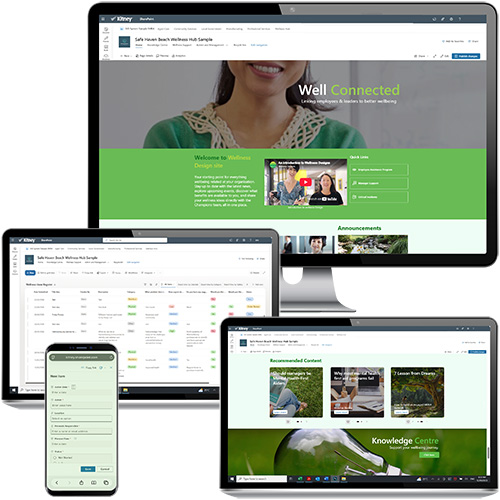
Key features
Who is the Wellness Hub for?
The Wellness Hub is ideal for organisations that:
- Want a central location for wellbeing information, resources and support.
- Need a better way to promote wellbeing initiatives and employee engagement.
- Are using Microsoft 365 and SharePoint and want to develop its use.
- Want to strengthen their wellbeing culture without purchasing additional software.
- Need a practical starting point that can grow over time.
 Tailored to your organisation
Customise branding, navigation, wellbeing themes, content, resources and support pathways to reflect your organisation and workforce.
 Connected services and support
Connect internal policies and programs with employee assistance, learning, health services and approved external providers, giving employees a clearer pathway to the right support.
 Built for engagement and ongoing use
Use news, events, campaigns, featured resources, calls to action and community content to keep the hub current and encourage employees to return.
 Built in Microsoft 365
Create a dedicated wellbeing hub using the Microsoft 365 tools you already own, including SharePoint, Power Automate, and Microsoft Teams.
 Capability that stays with your team
Training, templates and guided build sessions help your team understand the hub and confidently maintain it after launch.
 Great Value and One Off Fee
- No recurring subscription to Kitney Toolkit or Wellness Designs
- Digital products paid up front with support packages available
Before You Begin
To get the most value from the Wellness Hub project, organisations should have:
- Microsoft 365 with SharePoint Online
- Knowledge of SharePoint and Microsoft 365 tools
- A nominated wellbeing, HR or people leader
- Existing wellbeing resources, initiatives or support services
- Leadership commitment to workforce wellbeing
- Resources available for implementation and launch
- Basic understanding of SharePoint, Power Automate, QR codes, and MS Forms
Not sure if this is right for your business?
If you're unsure about your Microsoft 365 environment, knowledge or business processes, our Discovery, Training and Consulting services can help identify and support the right pathway for your organisation.
Contents
The 365 Wellness Platform Hub follows a practical four-stage pathway from strategy to launch. Final scope, timing and investment are confirmed after the initial Strategy Workshop.
How it works
1. Wellness Strategy Workshop
- Explore your wellbeing goals, workforce needs and platform requirements. Together we'll define your vision, priorities and implementation pathway.
- Investment: $995 + GST
2. Build SharePoint Capability
- Complete SharePoint training to build the skills and confidence needed to manage your Wellness Hub.
- Investment: $995 + GST per person
3. Build Your Wellness Hub
- Work with Kitney and Wellness Designs to configure and launch your Wellness Hub, including structure, navigation, content and user experience.
- Includes 20 hours of implementation support, including 10 hours of Microsoft 365 and SharePoint support.
- Investment: $6,995 + GST
4. Launch and Grow
- Receive coaching and practical support to help drive adoption, engagement and continuous improvement.
- 6 x 1-hour support sessions over 3-6 months.
- Investment: $1,895 + GST
What's included
 Typical hub content
Depending on your wellness resources, your Wellness Hub may include:
- Wellbeing strategy and commitments
- Wellbeing campaigns, events and communications
- Physical, psychological, social and financial wellbeing resources
- Employee support services and referral pathways
- Leader and manager resources
- Wellbeing Champion resources
- Learning content, guides and videos
- Feedback and engagement tools
- Emergency and support contacts
 Project Support
Every Wellness Hub project includes:
- Wellness Strategy Workshop
- Dedicated project workspace and action plan
- Structured implementation approach
- SharePoint and Microsoft 365 support
- Administrator training and capability building
- Launch and adoption support
- Expertise from Kitney and Wellness Designs
What's Not Included
The Wellness Hub project is designed to provide a structured and practical starting point for your digital wellbeing hub. The following services are not included in the standard package:
- Development of a corporate wellbeing strategy
- Creation of wellbeing policies, procedures or frameworks
- Large-scale content writing or content migration
- Custom SharePoint development or Power Apps development
- Advanced Power BI reporting and dashboards
- Integration with third-party systems
- Organisation-wide change management programs
- Internal communications campaigns
- Employee wellbeing assessments or surveys
- Ongoing platform administration
- Additional Microsoft 365 configuration outside the agreed scope
These services can be provided separately through Discovery, Consulting, Training, Tailored Solutions or Support packages where required.
Need More Than a Standard Implementation?
Not sure if you're ready? Start with a Wellness Strategy Workshop to identify the best pathway for your organisation.
If your organisation requires additional capability, custom functionality, wellbeing strategy support or broader workforce transformation initiatives, we can help scope a tailored solution during Discovery.
Ready to Get Started?
Book a Wellness Strategy Workshop or contact us to discuss your wellbeing goals and Microsoft 365 environment.
Support
"Empowering you with the support you need to succeed." 🌟
Provided below is an overview of our support, contact us if you can't find what you need.
365 Systems
- Welcome and Handover documents
- Core training modules to master your 365 system
- Project meetings, briefings and Quick Reference Guides
- Personalised sessions to build your confidence with your 365 system
- Support page with links for resources and support
 Apps and Dashboards
- Welcome and Handover documents
- Project meetings, briefings and Quick Reference Guides
- Personalised sessions to ensure you're confident with your app and dashboard
 Consulting and Retainers
- Kitney 5-D to explore needs, confirm approach, and support your journey
- Onsite and virtual depending on location and services
- Personalised briefing and coaching sessions
 Information and Training
- Free to access Info Centre
- Microsoft 365 briefings and training
- Learn at your own pace with online training modules
- Easy to follow Quick Reference Guides
- Kitney Toolkit M365 Community
 Network and Partners
 Research and Development
- Specific requests and solutions
- Exploring Microsoft for online management
- Shifting from online providers to Microsoft 365
Kitney Space
And our free to use Kitney Space in our Rocklea office for collaboration and focussed time working on 365 solutions and systems.
Contact Us
If you're unsure on the support you need, feel free to contact us, we’ll be pleased to talk with you.